passportsize-photo.com
Free Passport & Visa Photo Studio · No Sign-Up Required

Passport Size Photo Maker: Make Official Passport Photos at Home for Free

Crop and auto-align your portrait to official government standards for 50+ countries. Download high-resolution 300 DPI photos or printable 4x6" sheets for free.

100% Private (Runs in Browser)
50+ Official Country Presets
4x6" & A4 Print Tiling
Free Forever & No Watermark
PHOTO STUDIO & EDITOR

Photo Studio & Editor

50.8 x 50.8 mm (2 x 2 in)300 DPI (600x600 px)

US Passport & Visa standard. Plain white background. No glasses.

Photo Alignment & Crop

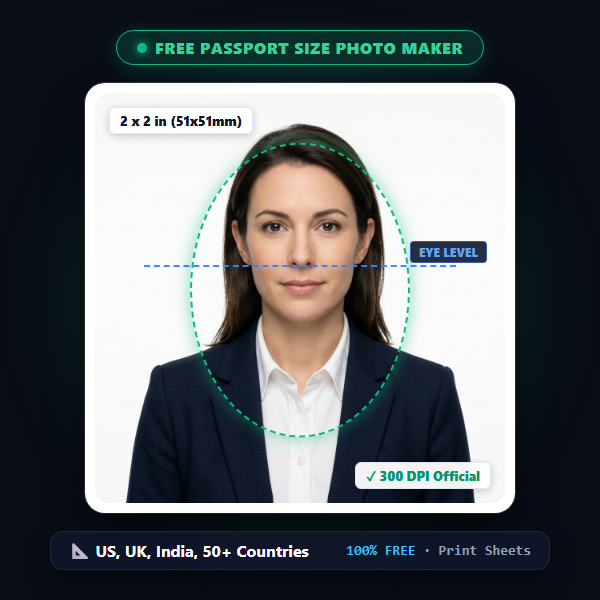
Drag photo to align eyes & chin within the biometric guide.

Zoom1.0x
Straighten / Rotate0°
Brightness100%
Contrast100%
Free Forever & No Watermark·Unlimited Downloads·No Watermarks·No Credits or Sign-Up
HOW IT WORKS & FEATURES

Simple, fast, and free for everyone.

Skip the $20 drugstore photo fees. Our browser tool makes creating, cropping, and printing official passport photos straightforward with no paywalls or watermarks.

Visual Alignment Guide

The overlay oval guides you to position your eyes and head height between the official 50%–69% government standards with ease.

Official Head Proportions

Print 6 Photos for ~35¢

Tile 2, 4, 6, or 8 photos onto standard 4x6" photo paper with clean cut lines. Upload to Walgreens, CVS, or Boots as a normal print.

4x6" & A4 Paper Tiling

100% Client-Side Privacy

Photos never leave your device. All face detection, cropping, enhancement, and rendering run entirely inside your browser.

Zero Cloud Image Uploads

50+ Country Presets

Pre-calibrated dimensions for US (2x2"), UK & Schengen (35x45mm), India, Canada, Australia, Japan, and worldwide standards.

Global Consular Standards
OFFICIAL CONSULAR CRITERIA

Passport Photo Guidelines & Rules

Avoid passport application rejection by following these universal biometric standards.

Neutral Expression & Closed Mouth

Look straight into the lens at eye level. Keep mouth closed, eyes open and clearly visible, without smiling or frowning.

  • ✓Direct eye contact with neutral expression.
  • ✓Both eyes wide open, mouth firmly closed, level shoulders.
  • ✕No teeth smiling, exaggerated grins, frowning, or head tilts.

No Eyeglasses, Hats, or Uniforms

Remove all glasses, sunglasses, headphones, and non-religious headwear. Wear everyday dark clothing contrasting with white backdrop.

  • ✓Wear normal dark-colored clothing contrasting with white backdrop.
  • ✕Remove glasses, sunglasses, and non-religious headwear.
  • ✕No headphones, wireless earbuds, or large jewelry.

Even Lighting & Plain Background

Use plain white or off-white backdrop. Ensure balanced lighting across both sides of the face with no harsh shadows.

  • ✓Stand 3 to 4 feet in front of a flat, plain white wall with daylight illumination.
  • ✓Balanced daylight illumination across both ears.
  • ✕Avoid direct phone flash that creates harsh neck or chin shadows.
👶

Baby & Infant Passport Photos

Taking photos of newborns at commercial studios can be stressful. Here is the easiest way to do it at home:

  1. Lay a clean white sheet flat on a bed in a bright room.
  2. Place baby comfortably on their back looking upwards towards you.
  3. Take multiple continuous shots from directly above.
  4. Ensure eyes are open, mouth closed, and no parent hands or pacifiers are visible.
💡

Budget Print Sheet Hack

Pharmacies and photo centers charge premium rates for "Passport Photos". You can get the exact same photos for pennies:

  1. Use our "Print Sheet Studio" tab and choose 4x6" paper size.
  2. Download the 300 DPI image containing multiple passport photos.
  3. Order it as a Standard 4x6" Print at any pharmacy or local lab.
  4. Cut out the photos along the clean cut guides!
COMPLETE PASSPORT PHOTO GUIDE & SPECIFICATIONS

How to Make Passport Size Photo Online Free with Biometric Accuracy

Everything you need to know about international dimensions, government rules, and converting smartphone snapshots into compliant prints.

Make Official Passport Size Photos Online for Free

Creating compliant passport size photos at home is simple, fast, and completely free. Whether preparing an official US passport size photo (2x2 inches), applying for an Indian passport size photo (35x45 mm), or formatting Schengen and UK visa photos, this guide explains how to convert photo to passport size with biometric accuracy. Adhering to official passport size photo dimensions prevents consular rejection, while our editor provides instant passport size photo free download access without watermark or fees.

Our free passport size photo maker helps you format, crop, and verify photos against government specifications from home. All adjustments run directly inside your web browser. You can export single high-resolution files at 300 DPI for online visa portals, or generate a 4x6 inch print sheet with multiple copies ready to print at any local kiosk for under 40 cents.

Standard Passport Photo Dimensions by Country

Physical dimensions and head height ratios vary by issuing government. Meeting the exact millimeter standard and 300 DPI resolution is essential to avoid application delays or rejection:

Document / CountryDimensions (mm)Dimensions (Inches)Resolution (300 DPI)Background
🇺🇸 US Passport & Visa51 x 51 mm2 x 2 inches600 x 600 pxPlain White
🇮🇳 Indian Passport (PSK)35 x 45 mm1.38 x 1.77 in413 x 531 pxPlain White
🇮🇳 Indian OCI & Visa51 x 51 mm2 x 2 inches600 x 600 pxPlain White / Off-White
🇬🇧 UK Passport (HMPO)35 x 45 mm1.38 x 1.77 in413 x 531 pxLight Grey / Cream
🇪🇺 Schengen Visa (27 EU)35 x 45 mm1.38 x 1.77 in413 x 531 pxPlain White / Off-White
🇨🇦 Canadian Passport50 x 70 mm1.97 x 2.76 in591 x 827 pxPlain White
🇦🇺 Australian Passport35 x 45 mm1.38 x 1.77 in413 x 531 pxPlain White / Off-White

Selecting any country preset loads the exact canvas dimensions and centers the biometric overlay oval. This guide shows the required head height (typically 50% to 69% of the frame) and eye-level position so you can align your photo accurately before downloading.

How to Take an Acceptable Passport Photo with Your Phone

You do not need studio lighting or a professional camera. Follow these four practical steps:

Set Up Even Lighting

Stand 3 to 4 feet in front of a flat, light-colored wall (white or light grey). Face a natural light source, such as a window, so both sides of your face are illuminated equally without shadows behind your ears or head.

Maintain Neutral Posture

Hold the camera at eye level. Keep your eyes open, mouth closed, and expression neutral. Remove glasses, hats, and wireless earbuds. Wear a dark shirt that contrasts clearly against your light background.

Upload and Position

Upload your photo or use the camera button. Choose your destination country to set the frame size. Move and scale your photo until the crown of your head and chin sit comfortably within the dashed biometric guide oval.

Download or Print

Download the single digital JPEG (with embedded 300 DPI density tags) for online portal uploads, or switch to the Print Sheet tab to generate a 4x6 inch sheet with 6 photos and cutting guidelines.

🇺🇸

US Passport Photo Rules

The US Department of State enforces strict standards for passport and visa applications:

  • • No Eyeglasses: Eyeglasses are not permitted in US passport photos under any circumstances, unless you provide a signed medical statement from a doctor.
  • • Plain White Background: The backdrop must be pure white or uniform off-white without shadows, textures, or household objects in view.
  • • Head Size: Your head (from the bottom of the chin to the top of the hair) must measure between 1 inch and 1 3/8 inches (50% to 69% of the photo height).
  • • Digital Specifications: Digital uploads for DS-160 and passport renewal must be 600x600 to 1200x1200 pixels at 300 DPI, saved as JPEG under 240 KB.
View Complete US Guide →
🇮🇳

Indian Passport Photo Rules

Passport Seva Kendras (PSK) and Indian consular missions enforce specific biometric criteria:

  • • Both Ears Visible: Hair must be tucked behind ears so both earlobes and facial contours are clearly visible.
  • • Contrasting Clothing: Wear clothing that contrasts with the white background; avoid white or cream shirts.
  • • PSK vs OCI: Domestic passport applications in India use 35 x 45 mm prints. OCI applications, Indian visas, and consular renewals in the US, UK, and Canada submitted through VFS Global require the 51 x 51 mm (2x2 inch) format.
View Complete India Guide →

How to Print 6 Passport Photos for Under 40 Cents

When you visit a pharmacy like CVS or Walgreens and ask for a "passport photo", they charge $16.99 to $21.99. However, the same stores print standard 4x6 inch photos for roughly 35 to 40 cents.

Our Print Sheet tool arranges up to six 2x2 inch or eight 35x45 mm photos onto a single 4x6 inch canvas with scissor cut lines. Save the sheet image to your phone or flash drive, order it as a standard 4x6 glossy print on the drugstore's website or in-store kiosk, and cut out the photos when you pick them up.

Browser-Based Processing for Privacy

Unlike mobile apps that send your personal portraits to external cloud servers, this editor operates completely inside your web browser. All image transforms, face centering, contrast adjustments, and sheet generation occur locally in memory using HTML5 Canvas.

Your photos are never transmitted over the internet, stored on a remote database, or used to train artificial intelligence models.

FREQUENTLY ASKED QUESTIONS

Got questions? We have answers.

Find quick solutions regarding sizes, background requirements, printing, and photo acceptance.

Is this passport size photo maker really 100% free?
↓

Yes, completely free with zero hidden costs, no subscription, no credit card, and absolutely no watermarks on downloaded photos or print sheets.

Are my uploaded photos private and secure?
↓

Yes! Our tool runs 100% client-side in your web browser. Your images are never sent to or stored on any server or cloud database.

How do I print passport photos on a 4x6" sheet?
↓

Switch to the "Print Sheet Studio" tab, select 4x6" paper, download your high-resolution 300 DPI sheet, and order it as a standard 4x6 photo print at CVS, Walgreens, or Walmart for under 40¢.

What are the official dimensions for US, UK, and Indian passport photos?
↓

US Passport: 2x2 inches (51x51 mm). UK and Schengen Visa: 35x45 mm. India Passport: 35x45 mm (and 51x51 mm for OCI). Our presets calibrate these automatically.

What size does a passport photo need to be?
↓

Passport photo size depends on the country issuing your passport or visa:

  • United States: Exactly 2 x 2 inches (51 x 51 mm), or 600 x 600 pixels at 300 DPI.
  • United Kingdom, India, Schengen (Europe), Australia: Standard international size of 35 x 45 mm (3.5 x 4.5 cm), or 413 x 531 pixels at 300 DPI.
  • Canada: 50 x 70 mm (2 x 2.75 inches).

Biometric standards also mandate that your head must take up 50% to 69% of the total image height centered on a plain white background.

What is the passport size photo size in cm?
↓

Official passport size photo in cm conversions:

  • Standard 35 x 45 mm = 3.5 x 4.5 cm (Required for UK, Schengen Europe, India, Australia, and New Zealand).
  • Standard 2 x 2 inches = 5.08 x 5.08 cm (51 x 51 mm, required for US Passports, US Visas, and Indian OCI cards).
  • Canada: 5.0 x 7.0 cm (50 x 70 mm).

Both 3.5 x 4.5 cm and 5.08 x 5.08 cm formats can be formatted and downloaded at 300 DPI directly in our free studio editor.

How to make passport size photo from iPhone or Android?
↓

Taking a compliant passport photo on your smartphone is simple:

  1. Lighting: Stand 3 to 4 feet in front of a flat, plain white wall in natural daylight.
  2. Rear Camera: Have a friend take the shot from 4 feet away at eye level, or use a tripod with timer.
  3. Posture: Neutral expression, eyes open, mouth closed, glasses removed.
  4. Crop: Upload to our studio editor for instant biometric auto-centering and 300 DPI export.
How to print passport size photo for pennies?
↓

You can print passport photos for pennies using our printable sheet feature:

  • At Drugstores & Retailers: Download our 4x6 inch printable sheet (tiling 4 or 6 photos). Order it as a standard 4x6 photo print (costing ~35¢) rather than asking for the $16.99+ passport photo service. Cut along the scissor lines.
  • At Home: Use glossy photo paper, select 4x6" paper size in printer settings, and print at 100% / Actual Size.

Photo Studio & Editor

Photos never leave your device. All face detection, cropping, enhancement, and rendering run entirely inside your browser.

Upload & Create Photo →